Using Debezium for CDC: What Works, What to Watch
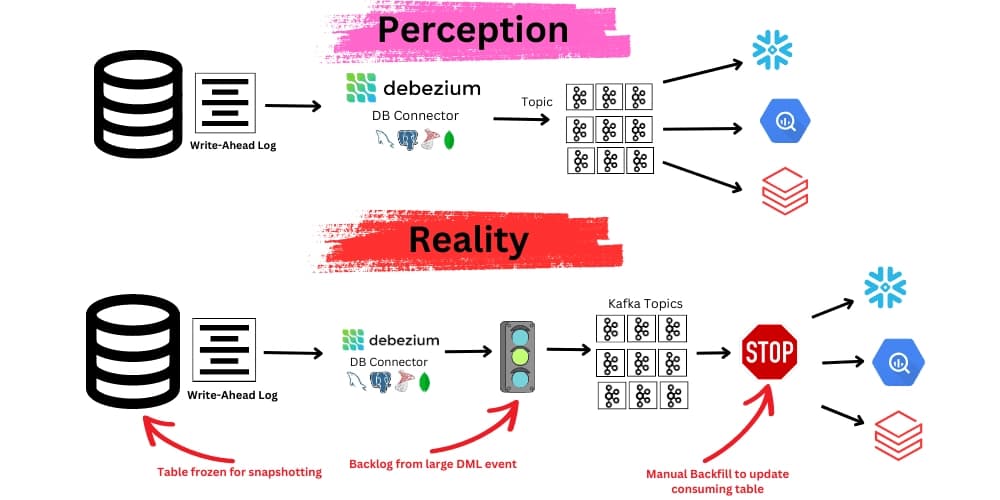
Change Data Capture (CDC) often feels like a plumbing problem—easy in theory, messy in practice. Debezium makes it surprisingly manageable, especially for teams looking to stream changes from relational databases into Kafka.
Here’s what makes it work, and where it can trip you up.
Why Debezium Works Well
Debezium simplifies CDC without touching your application logic.
-
Non-intrusive
No triggers, no app code changes. Just plug it into your DB. -
Event-driven
Changes stream out in near real-time. Works well for event-based systems. -
Full historical context
Since Debezium emits the full before/after state of each change, it’s easy to rebuild historical state or populate audit tables. -
Broad support
Works with MySQL, PostgreSQL, MongoDB, SQL Server, and Oracle. -
Kafka-native and open-source
Integrates naturally with Kafka Connect. No vendor lock-in.
Gotchas and How to Handle Them
Debezium is powerful, but it’s not magic. These are common pitfalls—and how to avoid them.
1. Initial Snapshot Behavior
- The problem: On first run, Debezium takes a full snapshot of your DB.
- Impact: Can overload consumers or duplicate data if you're not careful.
- Tips:
- Use
snapshot.mode=initial_onlyfor greenfield setups. - Use
snapshot.mode=neverto skip snapshots for existing systems.
- Use
2. Binary Log Retention
- The problem: Debezium depends on your DB’s write-ahead logs (WAL/binlogs). If logs get deleted before reading, you lose data.
- Tips:
- Set log retention (e.g., 7 days) based on worst-case lag.
- Monitor lag using
source.ts_msin CDC events.
3. Schema Changes
- The problem: Schema evolution (like adding a column) can break consumers.
- Tips:
- Enable schema evolution via Avro and Schema Registry.
- Set recovery policies like
schema.history.kafka.recovery.policies.
4. Tombstone Events
- The problem: Deletes emit a null-value “tombstone” record after the delete event.
- Tips:
- If using compacted Kafka topics, tombstones clean up old keys.
- If not, filter tombstones downstream (Kafka Streams, Flink, etc).
5. Handling Large Volume Writes
- The problem: ETL jobs and bulk inserts create a firehose of events.
- Tips:
- Use filters like
table.include.listor query exclusions. - Throttle downstream or batch process if needed.
- Use filters like
6. Outbox Pattern for Clean Events
Sometimes, row-level changes aren’t enough. You need domain-level events.
- Use case: When changes to multiple tables form a logical business event.
- How it works: App writes domain events to an
outboxtable. Debezium only reads that. - Benefit: Clear, debuggable event streams. No extra joins or leakage from internal tables.
Operational Best Practices
Debezium isn’t just about CDC—it’s about building a reliable pipeline. A few ops guidelines:
- Use Kafka Connect with external configs for restarts and versioning.
- Track connectors in Git. Treat them as infrastructure.
- Monitor lag with Kafka offset metrics. Pipe into Grafana via Prometheus.
- Encrypt Kafka traffic and secure DB access. ACLs matter.
Good Reasons to Ditch Triggers
You can often swap out custom DB triggers with Debezium for cleaner, real-time pipelines.
- Real-time audit or history tables
- Syncing to a reporting DB
- Powering live dashboards or alerts
- Keeping search indexes fresh
- Letting microservices react to DB changes
When Not to Use Debezium
Debezium isn’t perfect for every case.
- Ultra-low latency: It's near real-time, not sub-millisecond.
- Edge deployments: Needs Kafka and coordination infra.
- Sparse schema control: If you can't trust consistent schema evolution, this breaks easily.
- Write-heavy bulk systems: High-volume imports can overwhelm downstream services.
Use Debezium when you want safety, auditability, and stream-first thinking. Don’t use it if you're chasing the absolute lowest latency or don’t control your schema.